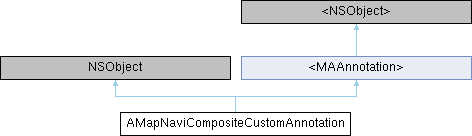
导航界面自定义标注 Custom annotations in the navigation interface since 5.5.0
More...
#include <AMapNaviCompositeAnnotation.h>
|
| (id) | - initWithCoordinate:view: |
| | 初始化导航界面自定义标注. since 5.5.0 Custom annotations initialized in the navigation interface will be displayed
|
| |
| (void) | - setCoordinate: |
| | 设置标注的坐标,在拖拽时会被调用. Set the coordinates of the annotation, which will be called during dragging
|
| |
导航界面自定义标注 Custom annotations in the navigation interface since 5.5.0
◆ initWithCoordinate:view:
| - (id) initWithCoordinate: |
|
(CLLocationCoordinate2D) |
coordinate |
| view: |
|
(UIView *) |
view |
|
|
| |
初始化导航界面自定义标注. since 5.5.0 Custom annotations initialized in the navigation interface will be displayed
- Parameters
-
| coordinate | 标注的中心坐标. The center coordinate of the annotation |
| view | 会被显示在驾车导航界面的地图上. 如需调整view的相对位置,请修改view.frame.origin On the map of the driving navigation interface. To adjust the relative position of the view, please modify view.frame.origin |
- Returns
- id 自定义标注对象 ID custom annotation object
◆ coordinate
| - (CLLocationCoordinate2D) coordinate |
|
readwritenonatomicassign |
标注的中心坐标 The center coordinate of the annotation
◆ enable
导航界面添加的自定义标注是否可以响应事件,默认为NO. since 7.5.0 Whether the custom annotation added in the navigation interface can respond to events, default is NO.
◆ identifier
导航界面添加的自定义标注的复用view的标识,注意:如果两个标注有不同的图标,这个复用标识必须设置,否则会出现复用混乱的现象. since 8.0.0 The reuse identifier of the custom annotation view added to the navigation interface. Note: If two annotations have different icons, this reuse identifier must be set, otherwise reuse confusion will occur.
◆ zIndex
z值,大值在上,默认为0. 类似CALayer的zPosition Z-value, higher values are on top, default is 0. Similar to CALayer's zPosition
The documentation for this class was generated from the following file:
 Instance Methods inherited from <MAAnnotation>