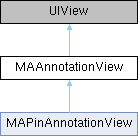
#include <MAAnnotationView.h>
|
| (void) | - setSelected:animated: |
| | 设置是否处于选中状态, 外部如果要选中请使用mapView的selectAnnotation方法 Set whether it is in the selected state, if you want to select it externally, use the selectAnnotation method of mapView
|
| |
| (id) | - initWithAnnotation:reuseIdentifier: |
| | 初始化并返回一个annotation view Initialize and return an annotation view
|
| |
| (void) | - prepareForReuse |
| | 当从reuse队列里取出时被调用, 子类重新必须调用super Called when taken out of the reuse queue, the subclass must call super
|
| |
| (void) | - setDragState:animated: |
| | 设置view的拖动状态 set the drag state of the view
|
| |
◆ initWithAnnotation:reuseIdentifier:
| - (id) initWithAnnotation: |
|
(id< MAAnnotation >) |
annotation |
| reuseIdentifier: |
|
(NSString *) |
reuseIdentifier |
|
|
| |
初始化并返回一个annotation view Initialize and return an annotation view
- Parameters
-
| annotation | 关联的annotation对象 associated annotation object |
| reuseIdentifier | 如果要重用view,传入一个字符串,否则设为nil,建议重用view if you want to reuse the view, pass a string, otherwise set it to nil, it is recommended to reuse the view |
- Returns
- 初始化成功则返回annotation view,否则返回nil Returns the annotation view if initialization is successful, otherwise returns nil
◆ prepareForReuse
当从reuse队列里取出时被调用, 子类重新必须调用super Called when taken out of the reuse queue, the subclass must call super
◆ setDragState:animated:
设置view的拖动状态 set the drag state of the view
- Parameters
-
| newDragState | 新的拖动状态 the new drag state |
| animated | 是否使用动画动画 whether to use animation |
◆ setSelected:animated:
| - (void) setSelected: |
|
(BOOL) |
selected |
| animated: |
|
(BOOL) |
animated |
|
|
| |
设置是否处于选中状态, 外部如果要选中请使用mapView的selectAnnotation方法 Set whether it is in the selected state, if you want to select it externally, use the selectAnnotation method of mapView
- Parameters
-
| selected | 是否选中 whether it is selected |
| animated | 是否使用动画效果 whether to use animation effects |
◆ annotation
关联的annotation associated annotation
◆ calloutOffset
| - (CGPoint) calloutOffset |
|
readwritenonatomicassign |
弹出框默认位于view正中上方,可以设置calloutOffset改变view的位置,正的偏移使view朝右下方移动,负的朝左上方,单位是屏幕坐标 The pop-up box is by default located above the center of the view, and the position of the view can be changed by setting calloutOffset. A positive offset moves the view to the lower right, and a negative offset moves it to the upper left, in screen coordinates.
◆ canAdjustPositon
| - (BOOL) canAdjustPositon |
|
readwritenonatomicassign |
弹出默认弹出框时,是否允许地图调整到合适位置来显示弹出框,默认为YES whether the map is allowed to adjust to a suitable position to display the popup when the default popup is displayed, default is YES
◆ canShowCallout
是否允许弹出callout Whether to allow callout to pop up
◆ centerOffset
annotationView的中心默认位于annotation的坐标位置,可以设置centerOffset改变view的位置,正的偏移使view朝右下方移动,负的朝左上方,单位是屏幕坐标 The center of the annotationView is by default located at the coordinate position of the annotation. You can set the centerOffset to change the position of the view. A positive offset moves the view towards the lower right, while a negative one moves it towards the upper left, with units in screen coordinates.
◆ customCalloutView
自定制弹出框view, 用于替换默认弹出框. 注意:此弹出框不会触发-(void)mapView: didAnnotationViewCalloutTapped: since 5.0.0 Custom pop-up view, used to replace the default pop-up. Note: This pop-up will not trigger -(void)mapView: didAnnotationViewCalloutTapped: since 5.0.0
◆ draggable
是否支持拖动 whether dragging is supported
◆ dragState
当前view的拖动状态 the dragging state of the current view
◆ enabled
默认为YES,当为NO时view忽略触摸事件 Default is YES, when NO the view ignores touch events
◆ highlighted
是否高亮 Whether to highlight
◆ image
◆ imageView
| - (UIImageView*) imageView |
|
readnonatomicstrong |
image所对应的UIImageView since 5.0.0 UIImageView corresponding to the image. since 5.0.0
◆ isOpenCollisionDetection
| - (BOOL) isOpenCollisionDetection |
|
readwritenonatomicassign |
是否开启碰撞检测,默认为NO。开启后标注会在地图缩放和密集显示时进行碰撞检测,避免重叠显示 Whether to enable collision detection, default is NO. When enabled, annotations will perform collision detection during map zooming and dense display to avoid overlapping display
◆ leftCalloutAccessoryView
| - (UIView*) leftCalloutAccessoryView |
|
readwritenonatomicstrong |
显示在默认弹出框左侧的view The view displayed on the left side of the default popup
◆ reuseIdentifier
| - (NSString*) reuseIdentifier |
|
readnonatomiccopy |
◆ rightCalloutAccessoryView
| - (UIView*) rightCalloutAccessoryView |
|
readwritenonatomicstrong |
显示在默认弹出框右侧的view the view displayed on the right side of the default popup
◆ selected
设置是否处于选中状态, 外部如果要选中请使用mapView的selectAnnotation方法 Set whether it is in the selected state. To select externally, use the selectAnnotation method of mapView
◆ zIndex
z值,大值在上,默认为0。类似CALayer的zPosition。zIndex属性只有在viewForAnnotation或者didAddAnnotationViews回调中设置有效。 z-value, larger values on top, default is 0. Similar to CALayer's zPosition. The zIndex property only takes effect when set in the viewForAnnotation or didAddAnnotationViews callbacks.
The documentation for this class was generated from the following file: